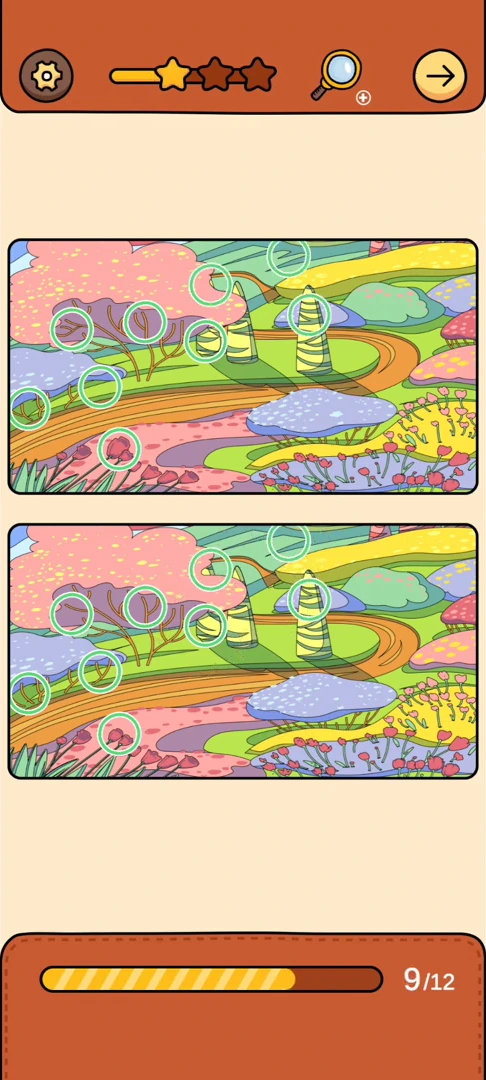
Find Out Differences reference 26: For Alien Landscape, compare these 12 marked areas in the matching picture pair; do not use the ordinal alone to choose a guide.
Last verified: · Verification method · Report a correction
Alien Landscape step-by-step solution
Match this exact picture and requested target list first. Match this reference scene and target set; app updates can reorder scenes. This page is Differences reference 26; its URL number is a Level Clue library ID, not current app numbering. 12 targets were checked for this reference variant. The overall game library is still in progress.
Step-by-step walkthrough
Match the pictured scene
Start at the upper edge: compare the hooked branch below the upper pink canopy; the diagonal stripe in the upper background; the branches inside the left-hand purple tree. Tap the differing detail in your own picture pair and check that the counter increases.
If the solution does not advance
- Compare the picture, target icons and target total. The same background can have different requested objects in another version.
- Scroll the target strip to check its full length. A next-stage button can unlock before every requested icon is collected.
- For interactive scenes, finish the preceding drag, hold or combination before looking for the resulting target.
Video walkthrough
The clip begins at the verified scene checkpoint. Compare the opening scene with the screenshot before copying the inputs.
This tab contains the matching gameplay segment only. Return to Written walkthrough for the ordered route, troubleshooting, and evidence links.
Quick feedback
Did this walkthrough match your game?
Your anonymous Yes or No helps us identify routes that need another check.