This guide is mapped to “Scheme” in Act 2 · Camilla. Compare the title, room colors, and main objects with the screenshot before following the sequence.
50 Tiny Room Escape Level 12 walkthrough & guide
50 Tiny Room Escape Level 12, titled “Scheme,” is a layered escape-room puzzle rather than a single lock. The room can be rotated, and several close-up views hide objects or clue fragments that make sense only when combined. The decisive objective is to unlock the USB design and print a replacement door handle. The game records completion through the printed handle being fitted to the door.
The screenshot above comes from the matching 50 Tiny Room Escape Level 12 segment of the credited full walkthrough. Use it to confirm the room identity, then work through the chain in order. Collecting a later object early is harmless, but skipping a mechanism can leave the next interaction unavailable and make a correct answer look wrong.
50 Tiny Room Escape Level 12 quick answer: Match the blue, green, and red statues to their papers, use the three keys to recover the USB, enter 12168 on the computer, reveal the pillow-symbol drawer, load its filament, and print the door handle.
Step-by-step walkthrough
Survey the room
Take the nail gun, pin the loose diagram, and pose the blue statue to match it; repeat the found diagrams with the green and red statues. Stay in the close-up until the item or visual confirmation appears, then use Back to return to the rotating room.
How to know the solution worked
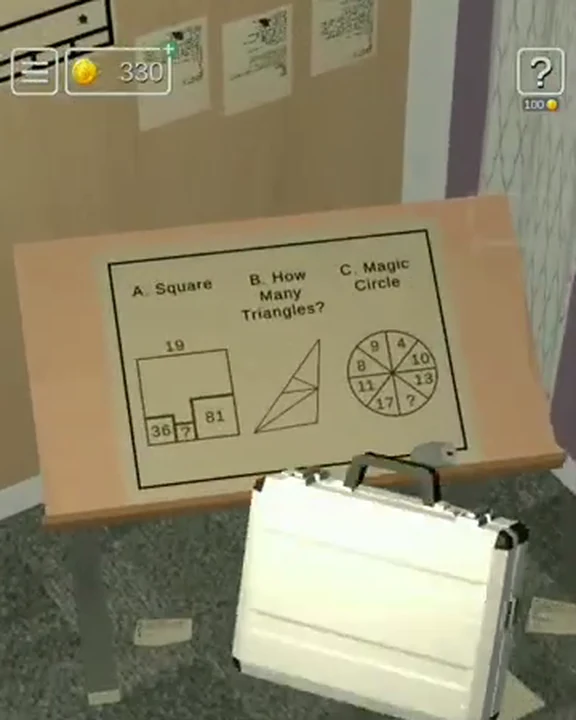
The most reliable confirmation is a visible state change: a compartment opens, a new item enters the inventory, the fire stops, or the final door releases. If 12168 is rejected, use the USB's requested answer order: magic-circle result 12, triangle count 8, and small-square area 16. Do not repeat the last input indefinitely. Return one step in the chain and confirm that the required clue object was collected or inspected.
Important notes
- Each colored statue follows a matching paper pose.
- The USB password is 12168.
- The pillow symbols unlock the filament.
- The printer must be powered before Start is selected.
Because the diorama rotates, two screenshots of the same level can show completely different walls. The level title and required objects are stronger identifiers than camera angle alone. This is why the 50 Tiny Room Escape Level 12 page uses one primary room image, an exact title, and a video segment with explicit start and end points.
Search and inventory tips
- 1Keep each pose paper beside its statue mentally.
- 2Connect both mouse and USB.
- 3Use the visible symbol order from left to right.
- 4Wait for the print cycle to finish before leaving the computer.
When the inventory appears full, inspect items before searching for another pickup. A tool may need a battery, key half, handle, or second clue before it becomes usable. After using an item, return to the room overview and rotate once; this makes the next altered wall easier to spot.
Cards and optional secrets
Scheme's optional cards are separate from the three statue keys and the printed door handle. Optional cards can be collected during the same run, but the exit sequence does not wait for them. If your only goal is to finish 50 Tiny Room Escape Level 12, prioritize the objects named in the quick answer.
Why the puzzle chain makes sense
The design of 50 Tiny Room Escape Level 12 teaches observation by splitting one answer across several physical relationships. A label supplies digits, a tool changes access, a visual pattern defines order, or a repaired device delivers instructions. The final keypad or door is therefore a summary of evidence already present in the room rather than a random guess.
In short, the complete 50 Tiny Room Escape Level 12 solution is: Match the blue, green, and red statues to their papers, use the three keys to recover the USB, enter 12168 on the computer, reveal the pillow-symbol drawer, load its filament, and print the door handle. Follow the steps in sequence, watch for each state change, and use the room image to recover your orientation whenever a close-up leaves you on the wrong wall.
50 Tiny Room Escape Level 12: Match the blue, green, and red statues to their papers, use the three keys to recover the USB, enter 12168 on the computer, reveal the pillow-symbol drawer, load its filament, and print the door handle.
What this video segment shows
The embedded 50 Tiny Room Escape Level 12 walkthrough starts at 2799 seconds and stops before Level 13 begins. It shows the actual “Scheme” room, the relevant close-up interactions, and the final exit. The player may rotate the diorama differently from you, so follow the objects and state changes rather than trying to duplicate every camera movement.
The key sequence is to unlock the USB design and print a replacement door handle. Watch for the printed handle being fitted to the door. That moment confirms that the solution has progressed; everything before it is evidence gathering, tool preparation, or access to the next mechanism. Keep the written steps open beside the clip so each short visual action remains connected to the clue that explains it.
Video checkpoints
- ROOMConfirm the title and layout
Match “Scheme,” the wall colors, and the largest furniture before copying any code.
- ITEMSTrack required objects
Notice where each tool appears and whether the player inspects, combines, or immediately uses it.
- CLUEPause on digits or patterns
Codes should come from visible room evidence. Pause the clip when the source clue is shown, not only when the keypad is filled.
- EXITVerify the final state change
The door or final mechanism visibly releases before the player leaves the room.
What to watch closely
Inventory selection is easy to miss in a vertical mobile recording. Look near the bottom of the screen immediately before a tool is applied. If 12168 is rejected, use the USB's requested answer order: magic-circle result 12, triangle count 8, and small-square area 16. If your room does not react, rewind to the preceding item pickup and confirm that your inventory contains the same object.
Before replaying the clip
- Each colored statue follows a matching paper pose.
- The USB password is 12168.
- The pillow symbols unlock the filament.
- The printer must be powered before Start is selected.
The footage is used as evidence for the order and result, not as a substitute for the written explanation. The text guide names each required dependency so you can continue without repeatedly scrubbing a long 50-level video.
Practice tips from the footage
- 1Keep each pose paper beside its statue mentally.
- 2Connect both mouse and USB.
- 3Use the visible symbol order from left to right.
- 4Wait for the print cycle to finish before leaving the computer.
Text recap
The full 50 Tiny Room Escape Level 12 answer is: Match the blue, green, and red statues to their papers, use the three keys to recover the USB, enter 12168 on the computer, reveal the pillow-symbol drawer, load its filament, and print the door handle. The video segment is credited to SLY MobileGaming and was published 2025-07-16. Level Clue embeds it through YouTube's privacy-enhanced domain and does not load the player until you press the button above.
Quick feedback
Did this clue help you?
Your anonymous Yes or No helps us find walkthroughs that need another check.